
If you want your photo sharper "just as it is," choose upscaling that doesn't redraw. Generative AI redraws a new image using your photo as a reference, so faces, text and the number of objects can change. Shaki enlarges your photo while AI fills in the fine detail, so the composition and people's faces stay based on the original photo. "Remaking" a photo, like changing the background or removing objects, is where ChatGPT and Gemini shine.
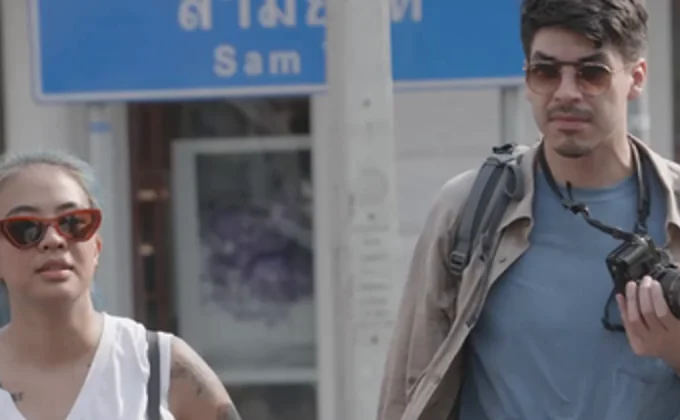
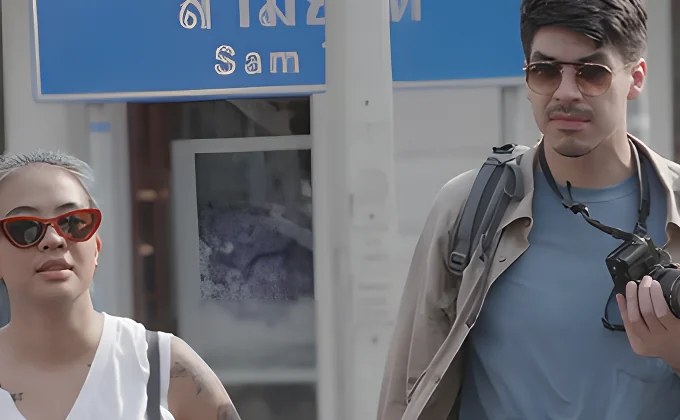
For this example, the original photo was shrunk to half its size and then brought back up to 2x. In the Shaki version, the two people keep the same faces, and even the frames of the glasses and the text on the sign are sharp.
Generative AI doesn't "enlarge" your photo
Both get called "upscaling," but what happens inside is completely different.
Super-resolution is AI that has learned, from many pairs of "blurry photos" and "sharp photos," how blur relates to the way things really look. Based on the arrangement of pixels in your photo, it fills in only the missing detail. What appears where is still decided by your original photo.
Generative AI, on the other hand, reads your photo as "reference material" and builds the image again from scratch. The result looks very much like your photo, but under the hood the whole photo is being redrawn, so even parts that didn't need redrawing can change.
5 changes that often happen when you upscale with generative AI
- 1Faces start to look like someone elseThe eyes, mouth and face shape can shift little by little until you get a face that "looks similar, but isn't them." In family photos, ID photos or profile pictures, that's hard to ignore.
- 2Text and logos changeText on signs and labels, especially non-English text and the shapes of logos, can get garbled or rewritten into different characters.
- 3Things that weren't there appearFences, patterns or small objects that weren't in the original can get drawn in. For photos you want to keep as a record, that changes the "facts."
- 4The number or shape of things changesSmall details, like the number of windows, doors or lights, or the shape of a vehicle, can come out different.
- 5The composition or colors changeThe framing can shift slightly, the image can get cropped without you asking, or the colors and mood can change.
Generative AI gets better every year at "staying close to the original photo," and this doesn't happen every time. But because it works by redrawing, some variation is unavoidable.
A few more things to keep in mind beyond the photo itself
- A mark saying it was made or edited with AI: Depending on the service, an invisible digital watermark or information indicating AI generation is embedded in the image. On free plans, a visible mark may be added as well.
- Your photo goes to the cloud: The image is sent to the service's servers. Depending on your settings, it may be used to improve (train) the AI.
- Usage limits, sign-up and fees: There may be a cap on how many times you can use it, or you may need to log in or pay for a plan. It also takes effort to keep rewording your request until you get what you want.
What Shaki can do: upscaling that doesn't redraw
Shaki is a free AI image upscaler that runs right in your browser. Using super-resolution AI (Real-ESRGAN), it enlarges photos 2x or 4x while filling in fine detail.
- Open Shaki and choose an image (PNG, JPEG or WebP)
- Pick a scale (2x or 4x) and upscale
- Compare before and after, then download
Your photo never leaves your device
Shaki does everything, including the AI processing, inside your own device (your browser). Your images are never sent to a server. You can use it with peace of mind, even for images you'd rather not show anyone, like family photos or work documents.
No sign-up, no usage limits, no watermark
There's no account to create and no login. You can use it for free on as many images as you like, and no watermark or AI-generation mark is added to the finished image. If you hold the rights to the original image, you're free to use the result for personal or commercial purposes.
What Shaki isn't good at
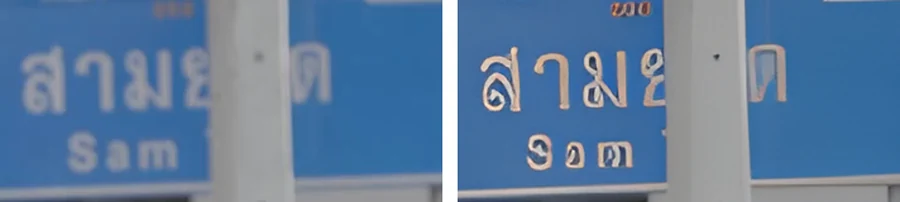
- Photos that are too small or badly blurred: There's a limit to how much detail can be filled in. Small text won't necessarily become readable, and its shape may break down.
- It won't rebuild faces for you: Because it doesn't redraw a face as a different face, badly blurred faces may not come out fully clear.
- Size and format rules: Input up to 1920px on the long side, output up to 3840px on the long side (about 4K). The scale is 2x or 4x.
- Large images are heavy on phones: For images 1024px or larger on the long side, we recommend using a PC.
Which to use when: a quick guide
| What you want to do | Best pick | Why |
|---|---|---|
| Sharpen family photos or photos of people | Shaki | Faces aren't redrawn, so no one turns into someone else |
| Make old photos or old phone photos easier to see | Shaki | Doesn't change the facts of the record, like what's in the photo or how many people |
| Use product photos at a larger size | Shaki | Enlarges without changing shapes, logos or colors |
| Enlarge screenshots, documents or diagrams | Shaki | Doesn't rewrite text (very small text has its limits) |
| Upscale images you'd rather not show anyone | Shaki | Your image is never uploaded |
| Enlarge illustrations or anime images | Shaki | Fills in detail in illustrations and anime, too |
| Swap the background or remove objects | Generative AI | Adding and removing things is what generative AI does best |
| Change clothes, poses or art style | Generative AI | "Remaking" the image is the whole point |
| Colorize a black-and-white photo or fill in parts that weren't captured | Generative AI (check the result) | Anything not in the original has to be "invented" |
FAQ
Will upscaling with Shaki give me exactly the same photo as the original?
Should I stop upscaling with ChatGPT or Gemini?
Can it sharpen photos where the face is blurry?
Can I use images upscaled with Shaki commercially?
Does it work on phones?
Does it work on illustrations and anime images?
* The example photos are from Pexels, whose license allows editing and commercial use, and were processed with the same AI model as Shaki. Generative AI features and free tiers can change, so this article reflects things as of October 2026.
About the author
Sharpen your photos without redrawing them
Shaki is free, with no sign-up. Your images are never uploaded.